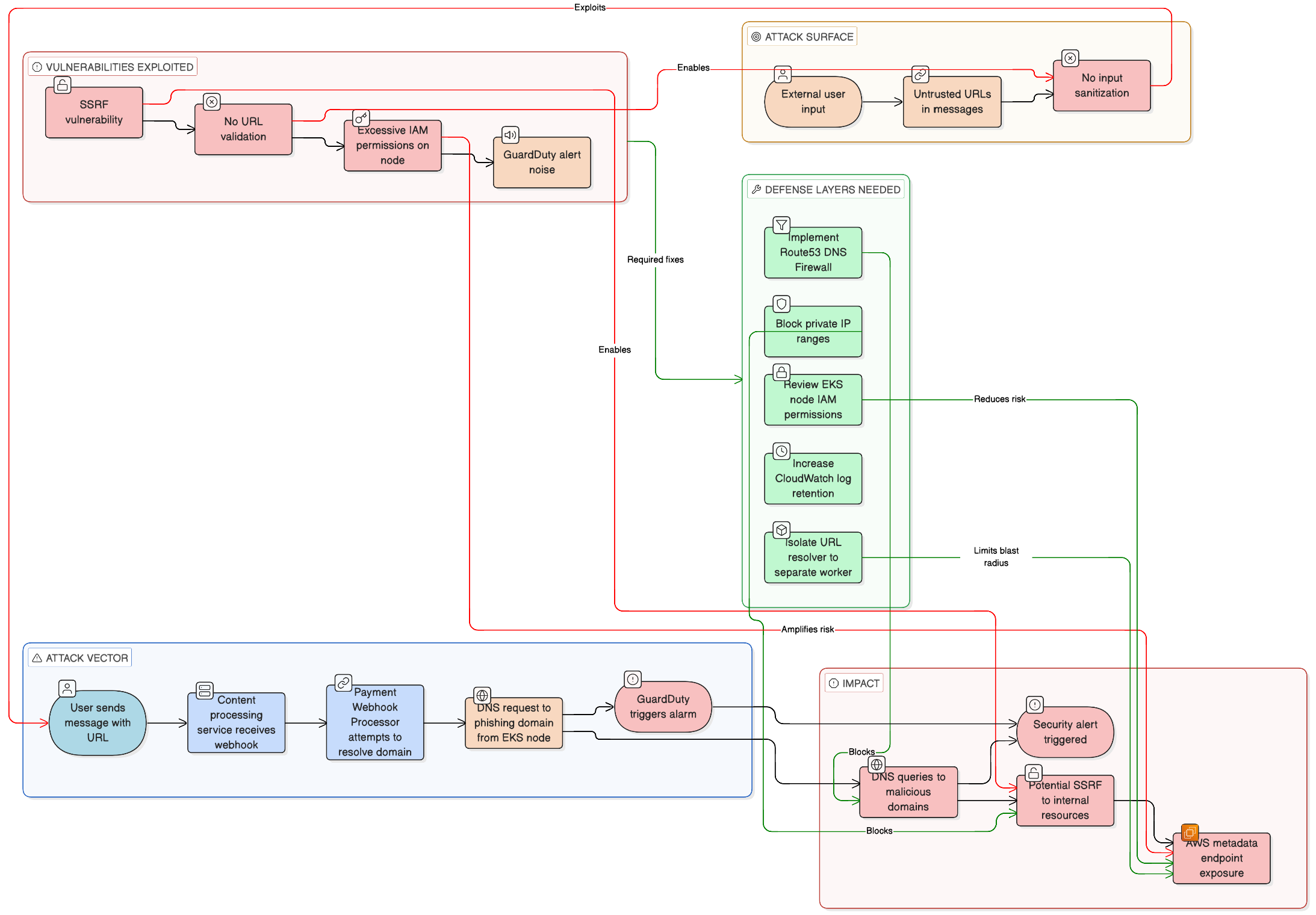
GuardDuty screams about a phishing domain. The node looks fine — no malware, no stolen creds. Often the real story is simpler: your app looked up a URL someone pasted in a message, and that hostname is on a threat list. The alert is still “true” (DNS to a bad name happened), but it is not a hacked cluster.
The uncomfortable part: if you resolve or fetch any user URL with no checks, you also open the door to SSRF — for example a link to 169.254.169.254 (instance metadata) from a worker that uses the node’s IAM role. That is a bigger problem than one noisy finding.
What actually happened (typical chain)
- User sends text with a link (e.g. a shady
.cndomain). - A webhook or message handler picks it up in EKS.
- Some code path (preview, image, “unfurl”) resolves the hostname or pulls the page.
- DNS goes out from the node where the pod runs.
- GuardDuty fires because that domain matches phishing/malware intel.
So: no infection required — just DNS toward a flagged name.
Quick checks when you investigate
App logs — usually the fastest. You should see the same hostname as in the finding, tied to a request or message id:
msg="fetch_preview" url="https://phish-example.cn/..." request_id=abc123
From a pod (sanity check):
dig +short phish-example.cn A
Before DNS Firewall: you get real A records. After you block the domain in Route 53 Resolver DNS Firewall, behavior depends on your resolver setup (often empty answer or no resolution).
GuardDuty — you will see the domain, instance, VPC, severity. The exact finding type string varies; the important bit is DNS_REQUEST + domain name. Example shape:
{
  "Types": ["Trojan:EC2/PhishingDomain!DNS"],
  "Severity": { "Label": "HIGH" },
  "Service": {
    "Action": {
      "ActionType": "DNS_REQUEST",
      "DnsRequestAction": { "Domain": "phish-example.cn" }
    }
  }
}
Fix the app: do not follow private / metadata URLs
Block these before you resolve or fetch: 10.0.0.0/8, 172.16.0.0/12, 192.168.0.0/16, 127.0.0.0/8, and 169.254.0.0/16 (covers 169.254.169.254 metadata).
Minimal Python idea — resolve host to IPs, reject bad ranges:
import ipaddress
import socket
from urllib.parse import urlparse

def ips(hostname):
    return {ipaddress.ip_address(x[4][0])
            for x in socket.getaddrinfo(hostname, None, socket.AF_INET)}

def ok_url(url):
    p = urlparse(url)
    if p.scheme not in ("http", "https") or not p.hostname:
        return False
    for ip in ips(p.hostname):
        # private LAN, localhost, link-local (includes 169.254.169.254 metadata)
        if ip.is_private or ip.is_loopback or ip.is_link_local:
            return False
    return True

print(ok_url("http://169.254.169.254/latest/meta-data/"))  # False
In production you still want timeouts, redirect limits, and egress rules — DNS rebinding can bite you if you only check the first hop.
Fix the noise: Route 53 DNS Firewall
Use AWS managed domain lists (malware + aggregate threat) in a firewall rule group, then attach it to the VPC where EKS nodes live. Docs: managed domain lists.
Sketch:
aws route53resolver list-firewall-domain-lists --region "$AWS_REGION" \
  --query "FirewallDomainLists[?ManagedOwnerName=='Route53 Resolver']" --output table

RFG=$(aws route53resolver create-firewall-rule-group --region "$AWS_REGION" \
  --name "block-known-bad-domains" --query FirewallRuleGroup.Id --output text)

# plug LIST_ID from the table (e.g. malware managed list)
aws route53resolver create-firewall-rule --region "$AWS_REGION" \
  --firewall-rule-group-id "$RFG" --firewall-domain-list-id "LIST_ID" \
  --priority 100 --action BLOCK --name "malware-list"

aws route53resolver associate-firewall-rule-group --region "$AWS_REGION" \
  --firewall-rule-group-id "$RFG" --vpc-id "$VPC_ID" --priority 101 --name "eks-vpc"
That stops a lot of known-bad names at DNS, before your app even opens TCP.
Bigger win: move “fetch user URLs” to a small worker
Run preview / URL fetch in a separate job with narrow egress and minimal IAM — not on the same path as your main API on nodes that carry fat instance roles.
Practical notes
- Check application logs first when GuardDuty names a domain; it saves hours.
- Raise EKS control plane log retention if yours is short — old node events disappear fast.
- Shrink node IAM — SSRF to metadata is about credentials, not only alerts.
- User-supplied links will eventually hit phishing lists; document that so people do not treat every DNS finding as an incident.
The diagram above is the same story in one screen: how the traffic flows, what breaks, what to add. False positive for “we are hacked,” real work on SSRF, DNS, and IAM.