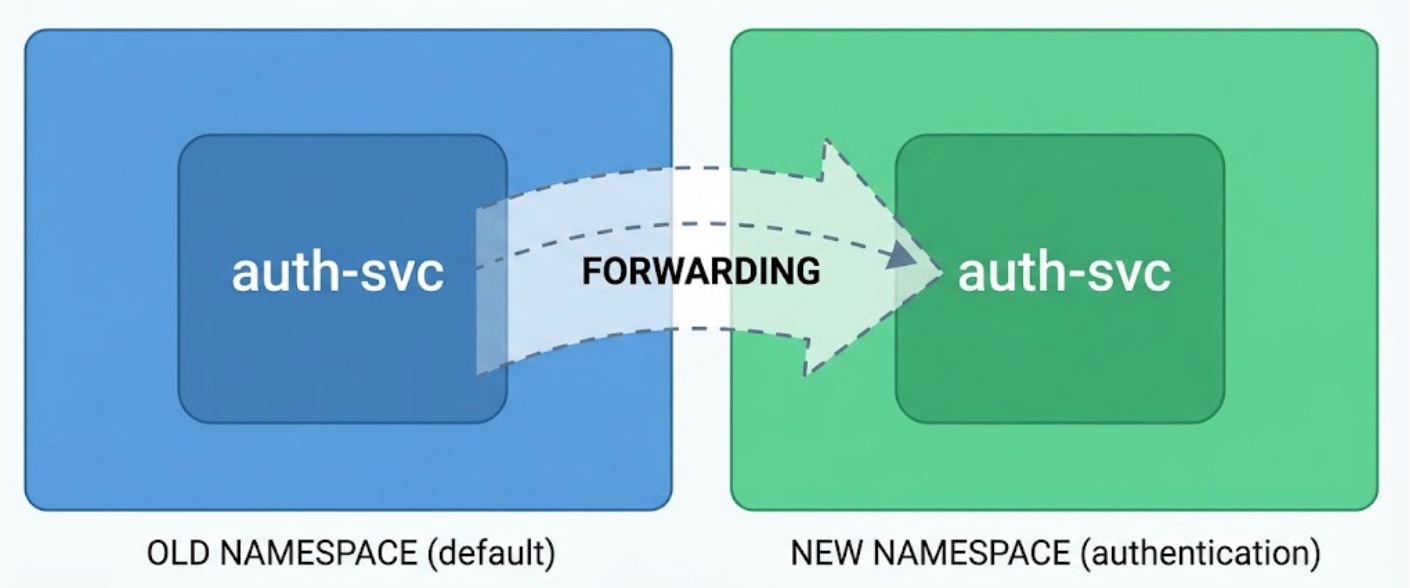
CNCF published a nice write-up by George Sims: Migrating a critical Kubernetes deployment from the default namespace without any downtime. The story is about an auth service that lived in default for years, but the approach works for moving any service from one namespace to another. default is just the example.
The main idea is simple. You keep the old DNS name alive as a compatibility point. In the old namespace you leave a Service of type ExternalName that points to the service in its new namespace, and callers keep working without changing anything.
I’ve seen this come up in a few situations:
- renaming a namespace, like
paymenttopayments - moving a service out of a shared namespace into the team’s own namespace
- promoting something from a temporary namespace into the production one
- moving between environment namespaces inside the same cluster
One thing to keep in mind from the start: internal and external traffic are two separate problems. Moving the Service handles callers inside the cluster. It does nothing for traffic that comes in through an Ingress, and that part needs its own plan.
Why you can’t just move it
In the article the service was called auth-svc and dozens of other services called it by auth-svc.default.svc.cluster.local. Those services belong to different teams with different release schedules. Some of them hadn’t been deployed in months. There’s no single moment when you can switch all of them to a new name at once, and chasing every team to update a config value is not a good use of anyone’s time.
There were two more constraints that will probably sound familiar:
- The deploy pipeline could only ship a service to one namespace. Changing shared pipeline code that every other team relies on was too risky.
- An OPA policy blocked identical Ingress rules from existing in two namespaces at the same time. That’s a reasonable rule, it’s there to stop half-finished migrations with ambiguous routing. But it also blocks the obvious way to move an Ingress safely.
ExternalName as a forwarding address
An ExternalName Service doesn’t select pods. It returns a CNAME to another DNS name. So you deploy the real service in the new namespace and then turn the old Service into a pointer:
|
|
Anyone still calling auth-svc.default.svc.cluster.local now resolves to the new service. Nobody has to change code or config. Teams can move to the new name whenever they get around to it. The author compares it to a postal forwarding order, which is exactly how it feels.
The order of steps
This is roughly how I’d run it, following the article:
- Create the new namespace and deploy the service there with its own Service. Keep the same port numbers as the old one (more on that below).
- Bring along everything the pods need: Secrets, ConfigMaps, ServiceAccount, RBAC, NetworkPolicies.
- Test the new service directly by its new DNS name before anything points at it.
- Switch the old Service to
ExternalName. - Watch metrics. Make sure requests hitting the old name really land on the new pods and aren’t failing or looping somewhere.
- Handle the Ingress (next section).
- Scale the old Deployment to zero. Don’t delete it yet.
- Later, once everyone has moved to the new name, delete the old Deployment and the
ExternalNameService.
Step 7 is a small thing that I really like. Scaling to zero costs nothing and gives you an instant rollback: scale back up and switch the Service back. Deleting everything right away means rebuilding from scratch if something breaks a week later. Cleanup can wait.
The Ingress chicken-and-egg problem
External traffic doesn’t use the cluster DNS name at all. It comes through the Ingress. You need a working Ingress in the new namespace before you remove the old one, otherwise there’s a gap. But the policy won’t let both exist at the same time.
The article’s fix was a temporary, explicit exception instead of fighting the policy. Annotate the new namespace so the duplicate-ingress check is skipped for this migration:
|
|
Then:
- Create the new Ingress next to the old one.
- Check that traffic reaches the new deployment.
- Delete the old Ingress.
- Remove the annotation.
So you get a short, planned window where both exist, instead of a window where neither does. The annotation name above is just an example. Use whatever your policy engine supports, and don’t forget step 4. Temporary exceptions have a habit of becoming permanent.
Things that can bite you
The article keeps it high level, so here are a few details I’d check before doing this in production:
- Ports.
ExternalNameis only a DNS alias, there’s no port mapping. Clients connect to whatever port they used before, so the new Service has to listen on the same port. - TLS. If callers talk HTTPS or mTLS to the service and verify the hostname, the certificate must be valid for the old name too, because that’s the name the client asked for.
- Host header. The HTTP
Hostheader will still carry the old name. If the app or anything in front of it routes by host, it has to accept both. - Service mesh. Istio and friends treat
ExternalNameservices differently from normal ones. Test it in your mesh setup, don’t assume. - NetworkPolicies. A new namespace often comes with default-deny rules. Make sure pods from all the calling namespaces are allowed in.
- Cached DNS and long connections. Clients with DNS caching or long-lived connections (gRPC, connection pools, JVM apps) may keep going to the old ClusterIP for a while. That’s another reason to keep the old pods running for some time and look at the metrics before scaling down.
- Changing the Service type. For
ExternalNametheclusterIPfield has to be empty. Depending on how you apply manifests, the API server may reject the update. Try the change in dev first so you’re not surprised in prod.
And the big one, which the author mentions at the end: all of this only works because everyone reached the service by DNS name. If some legacy consumer uses a hardcoded IP or ClusterIP, the forwarding trick won’t help them and you have a different problem.
How it went live
It wasn’t done straight in production. It went to dev first, then staging, and then there were a couple of weeks between the staging cutover and the real one, just to see if anything strange showed up under real traffic.
The author says the production cutover ended up being the boring part. All the hard work was in the design. I think that’s the right outcome for a migration like this.
Why services stay stuck in default
The last point in the article is the one I agree with most. Services don’t end up in default because people are careless. They stay there because nothing forces anyone to move them. Someone adds a policy that stops new services from landing in default, which is good, but nobody makes a plan for the ones already there. Then years later a team needs something namespace-scoped and suddenly the move is urgent.
So if someone says a service can’t be moved because too many things depend on it, check how those things find it. If it’s through DNS, an ExternalName Service plus a short, controlled overlap is usually enough to move it without anyone noticing.